As an Amazon Associate, we earn from qualifying purchases. Some links on this site are affiliate links at no extra cost to you. Our recommendations are based on thorough research and editorial judgment.


Why Some Motion Lights Flicker and How the Technology Causes It

1) Causes: Motion sensors switch line voltage rapidly, creating 0.2–1.5 s turn-on transients and possible 0.5–3 Hz cycling, which produces millivolt-level fluctuations that sensitive LED drivers register as flicker. 2) Compatibility: Legacy sensors expect 40–60 W resistive loads, while LEDs use 5–20 W, causing TRIAC misfiring unless LED-rated sensors or 10–20 W dummy loads are used. 3) Troubleshooting: check wiring, voltage drop >5%, and bypass the sensor to confirm; further steps follow in full guide.
Key Takeaways
- Motion sensors rapidly switch power on/off when sensing movement, causing inrush/current surges that can make LEDs flash or flicker.
- Many sensors were designed for high-resistive loads; low-wattage LED loads can cause unstable cycling and visible flicker.
- LED drivers are sensitive to small voltage transients; sudden supply changes from switching can disrupt driver regulation and produce flicker.
- Poor or loose wiring and voltage drops amplify flicker by creating intermittent supply and inconsistent driver input.
- Incompatible dimmers, legacy sensor electronics, or subpar LED drivers can’t respond to fast cycling, so replacing components or adding a dummy load fixes it.
How Motion Sensors Control Lighting
1. Motion sensor control overview: Motion sensors use passive infrared or microwave detection to sense heat or movement, and a motion sensor switch rapidly connects power to lighting circuits when motion is detected, typically within 0.2–1.5 seconds, causing a sudden current surge to LED lights that can produce a visible flicker or flash. 2. Sensitivity and timing: Adjustments to sensitivity, detection range (3–12 meters), and time-out (5–300 seconds) influence how often the switch cycles, excessive cycling increases on-off shifts. 3. Energy-saving modes: Duty-cycling and hold-off features deliberately pulse output to save power, test compatibility with driver electronics. 4. Implementation: Specify sensor type, match sensor output to LED driver requirements, and set timings to minimize rapid switching. Models like the MAGAGUVU offer remote control capability, which allows users to adjust settings conveniently and reduce the need for frequent manual intervention. Consult datasheets and test in situ before deployment.
Why LEDs Are Prone to Flicker

The rapid on-off cycling produced by motion sensor switches exposes LEDs to voltage and current transients, which, when combined with driver limitations, dimmer mismatches, or supply instability, makes LEDs susceptible to visible flicker. 1. Sensitivity to voltage: LEDs respond to millivolt-level fluctuations, a 5–10% variation in a 120 V RMS power supply can produce flickering, consequently regulation is required, use drivers with ±1% output tolerance and >100 kHz switching to smooth transients. 2. Driver and load issues: low-quality LED drivers fail to maintain constant current under rapid cycling, overloading circuits with more than 10 fixtures on a single 20 A branch circuit can reduce headroom. 3. Temperature and dimming: incompatible dimmer switches alter waveform leading to pulse width modulation conflicts, replace with LED-rated dimmers. It’s essential to consider energy-saving designs that reduce electricity costs and offer eco-friendly benefits, as these models are more resilient against flickering issues.
Common Compatibility Problems Between Sensors and LEDs

When motion sensors designed for legacy lighting are paired with LEDs, leakage currents, rapid cycling, and load mismatch often produce visible flicker. 1. Sensor-LED compatibility: Many motion sensor circuits expect resistive loads above 40 to 60 W, whereas LED lighting draws 5 to 20 W, causing insufficient current draw and intermittent operation. 2. Rapid cycling: Sensors that cycle at 1 to 3 Hz can exceed LED driver response, creating perceptible flicker during activation. 3. Dimmer and tube examples: Standard TRIAC dimmers and LED tubes often require dedicated LED-rated sensors or neutral connections to maintain stability. 4. How to troubleshoot and resolve: Verify manufacturer ratings, measure load with a multimeter, replace sensors with LED-compatible models, or add a dummy load of 10 to 20 W. Additionally, considering motion detection features such as adjustable detection angles and ranges can help minimize false triggers and improve performance in various settings.
Wiring, Voltage, and Electrical Causes of Flicker
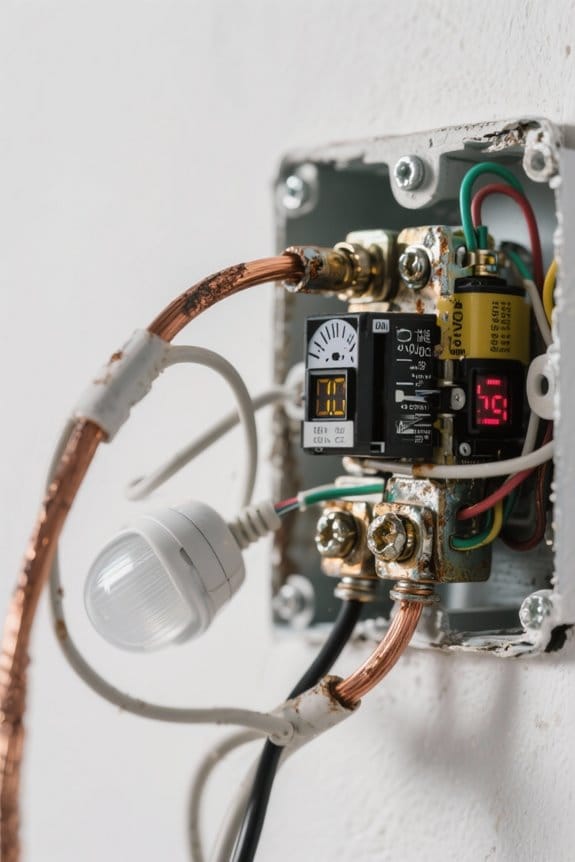
Although many cases of motion-light flicker are attributed to sensor design, wiring faults and voltage instability are equally frequent causes, producing intermittent or cyclic light output that mimics compatibility problems. 1. Wiring diagnostics: loose connections, incorrect neutral and line configurations, or undersized conductors cause intermittent supply, measured as voltage drop exceeding 5% under load, and require torque-verified terminations and 12–14 AWG replacements for typical residential circuits. 2. Voltage behavior: voltage fluctuations from sensor outputs, overload conditions, or supply sag can induce rapid cycling in LEDs, observable as 10–30 Hz modulation that appears as flicker. 3. Component quality: low-quality LED drivers and incompatible motion sensors often fail to regulate current, install matched drivers and sensors for reliable operation. Regular maintenance prevents many electrical failures effectively. In addition to these factors, ensuring that motion sensor lights have an IP65 waterproof rating can also contribute to their durability and reduce the likelihood of flickering due to environmental stressors.
How to Test and Diagnose Motion-Activated Flickering

1. Start by checking the motion sensor settings to diagnose and set sensitivity, reducing false activations provoking flickering and preserving energy efficiency. 2. Use an ohm meter to measure continuity and resistance across connections, expect under 2 ohms for tight splices, and measure sensor output voltage with a multimeter, noting stable DC or 120 VAC as appropriate. 3. Inspect wiring for looseness or frays, tighten terminals to manufacturer torque, and document intermittent opens that correlate with light pulses. 4. Temporarily bypass the motion sensor, supply steady voltage directly to the fixture to determine whether the sensor causes the issue. 5. Verify sensor and LED compatibility specifications, compare driver requirements and reported luminance behavior. Record all measurements, dates, and conditions for analysis and reporting. Additionally, motion sensors may struggle in extreme weather conditions, affecting their detection accuracy and potentially contributing to flickering issues.
Recommended Products

HANDPICKED BY AMAZON: They did the research so you don’t have to.

Pure Black: With a high luminance panel and temperature sensor, this TV with XR Contrast Booster precisely controls light for brighter pure black pictures | Real World Color: With XR Triluminos Max, experience billions of vivid, lifelike colors powered by millions of self-illuminating pixels

✅ 4-Tier Wattage & 35% Energy Savings— With four selectable wattages (400W/320W/240W/100W), this single product line covers full-scenario heights from 10–60FT, eliminating the need for mixed-model purchases. The "one product replaces multiple solutions" design precisely matches wattage to installation height, slashing energy consumption by over 35% and reducing maintenance time by 40%—ideal for large factories, warehouses, and facilities with varying ceiling heights.
Practical Fixes, Upgrades, and Best Practices
Because reliable long-term performance depends on targeted interventions and component compatibility, this section presents numbered, actionable remedies and practical fixes for motion-activated flicker, each with implementation guidance: 1) Replace the motion sensor with LED-rated units: select sensors specified for LED loads, 10–200 W, guarantee compatibility with 120 VAC and zero-cross switching to reduce flicker. 2) Adjust sensitivity and timeout: set PIR sensitivity to 50–70% and timeout to 10–30 seconds to prevent rapid cycling and problems with motion. 3) Use LED fixtures with built-in drivers: choose drivers with constant-current output, 350–700 mA, to address potential reasons. 4) Add circuit stabilization: add 0.1–1 µF bypass capacitor or 10–50 Ω dummy load across output. 5) Maintain wiring: tighten terminals to 5–7 in·lb torque and inspect for corrosion. High-quality motion sensor shed lights often come with multiple modes and features like waterproofing, enhancing usability and light quality.
Frequently Asked Questions
Why Do My Motion Sensor Lights Flicker?
They flicker because motion sensors rapidly switch power to adjust light intensity, combined with electrical issues or poor bulb compatibility, and low-quality drivers or sensitivity settings amplify the intermittent cycling, causing visible flicker under use.
Why Are Certain Lights Flickering?
Certain lights flicker because incompatible motion sensors, poor light technology or faulty drivers cause unstable output; flickering bulbs often indicate electrical issues, sensitivity misalignment, voltage fluctuations, or circuitry conflicts prompting professional inspection or regular replacement.
What Does the Bible Say About Flickering Lights?
Gentle dimming aside, Scripture does not mention flickering lights directly; biblical interpretations treat such flickering lights as metaphorical, emphasizing spiritual significance and light symbolism—warning against wavering faith while urging steadfast illumination and faithful moral witness.
Why Is My LED Dusk to Dawn Light Flashing?
The light is flashing because sensor issues, LED technology sensitivity, power fluctuations, or fixture problems cause intermittent output; diagnosing the sensor, wiring, or driver will identify and resolve the flashing and prevent further damage quickly.


