As an Amazon Associate, we earn from qualifying purchases. Some links on this site are affiliate links at no extra cost to you. Our recommendations are based on thorough research and editorial judgment.


Why Your Motion Sensor Light Stays On and How to Fix It

1) Causes: sensor oversensitivity, lens contamination, loose wiring, incorrect mounting (2–4 meters), or failed PIR detectors, often triggered by pets, HVAC drafts, or insects. 2) Diagnostics: visually inspect lens, test voltage with multimeter at 120/240 V, power-cycle breaker for 1–2 minutes, and reset firmware by removing power 30–60 seconds. 3) Fixes: clean lens, reduce sensitivity, adjust time-out, replace sensor or add surge protector (IP65 recommended). See full guide for instructions.
Key Takeaways
- Dirty lenses, insects, or debris can falsely trigger sensors; clean the lens and housing to restore correct detection.
- Incorrect sensitivity, timer, or detection angle settings can keep lights on; adjust settings and reposition the sensor.
- Wiring faults, loose neutrals, or backfeed can energize the fixture; visually inspect connections and call an electrician if uncertain.
- Faulty electronics or aged sensors often fail “stuck on”; power-cycle the circuit, then replace the sensor or fixture if issue persists.
- Environmental factors (heat, moving branches, pets) trigger continuous activation; remove nearby motion sources or change sensor placement/height.
Common Reasons Motion Sensor Lights Stay on
1) Overview: Common causes for persistent illumination are environmental triggers, hardware faults, and installation errors, each requiring targeted correction. 2) Environmental triggers: High sensitivity settings allow the sensor to respond to minor movements, such as wind-blown leaves within a 10–20 foot detection zone, producing continuous activation. 3) Hardware faults: Power surges or electrical anomalies can latch sensors into an on state, and dust, debris, or lens damage impair infrared or microwave reception, reducing detection accuracy. 4) Installation errors: Incorrect mounting height, typically outside the manufacturer recommended 6–10 feet, or improper angle will compromise coverage, producing constant illumination. 5) Recommendation: Inspect and clean lenses, verify sensitivity settings, replace defective modules promptly. Professional servicing is advised when modules exceed manufacturer lifespan or exhibit recurrent failures. Motion sensor bulbs are generally not compatible with dimmer switches, which could lead to operational issues if installed improperly.
Recommended Products

1.0"-type Exmor R CMOS sensor for a wide range of shooting conditions, High sensitivity and high resolution, Sony G Lens (optical 12x zoom) with Optical Steady Shot, 24x Clear Image Zoom, and 48x Digital Zoom

High Image Quality: EOS 5D Mark IV digital 4K camera features a 30.4 megapixel full-frame CMOS sensor for versatile shooting in nearly any light; delivers exceptional results with efficiency and ease

FASTER AUTOFOCUS: Shoot up to 24fps with 0.05s auto focus and wide 315 phase-detection AF points
How to Tell if the Sensor or the Wiring Is at Fault

How can one determine whether a persistent motion light problem stems from the sensor module or from the building wiring? 1. Visual and manual inspection: examine wiring for damage, loose connections, corrosion, and verify sensor’s sensitivity settings, then manually trigger the unit to observe response. 2. Multimeter diagnostics: measure voltage at the fixture, verify expected supply (usually 120V or 240V), and check for continuity across wires using the multimeter’s continuity function to detect breaks. 3. Comparative testing: if multiple lights fail identically suspect a common wiring fault, if a single unit alone fails despite proper wiring, replace the sensor module. 4. Documentation: record readings, actions, and outcomes for professional handoff if unresolved. Follow safety protocols, de-energize circuits, and consult an electrician when necessary promptly. Solar-powered security lights are eco-friendly alternatives to traditional lighting that enhance home safety and reduce reliance on the electrical grid.
Quick Reset: Turning the Light off and on Safely

When performing a quick reset, the technician should turn the fixture off for at least 30 seconds to allow internal timing circuits and charge-storage components to discharge, then restore power and observe sensor response by walking through the detection zone. 1) Procedure: The technician powers the fixture off at the wall switch, times 30–60 seconds with a stopwatch to verify capacitors and logic modules discharge, then turn it back on, and verifies sensor activation across the full detection arc. 2) Verification: If the quick reset fails, document behavior, inspect lens cleanliness and sensitivity settings, because frequent resets suggest calibration or contamination faults. 3) Safety: Use insulated tools and avoid wet conditions, maintain caution to prevent electrical hazards. Further diagnostic steps may be required immediately. A variety of lighting modes tailored to consumer preferences, such as dusk-to-dawn operation, can also be adjusted to ensure proper functionality of the motion sensor light.
Power-Cycle at the Breaker: When and How to Do It
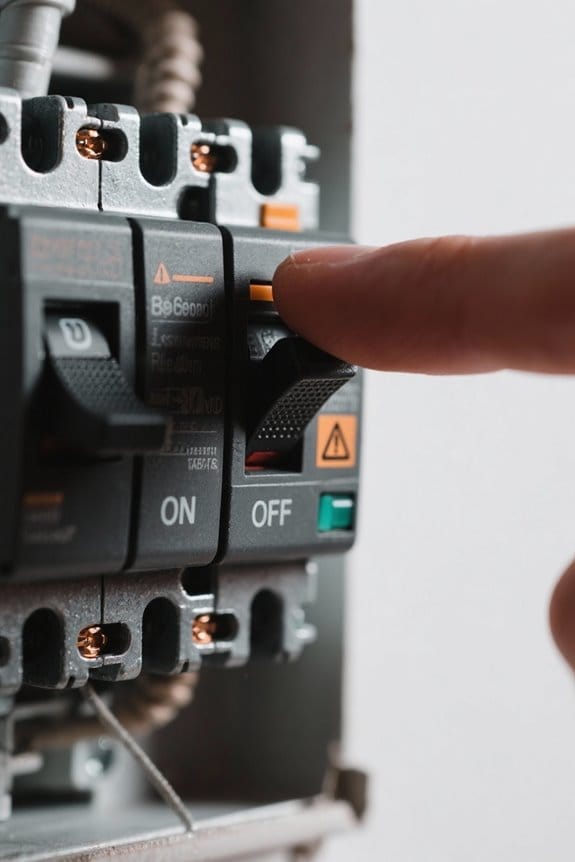
- Power-cycle procedure: The installer locates the correct breaker by circuit labeling or by temporarily shutting off likely breakers, turn the switch off at the panel and maintain off for one to two minutes, this allows capacitors and internal electronics to discharge fully and effectively resets the control board after a power surge or firmware glitch.
- Verification: After restoring power, simulate motion across the sensor’s detection zone at normal walking speed, observe the unit’s activation and timed shutoff, confirm the sensor responds appropriately and the lamp no longer remains stuck on.
- Precautions: Label the breaker, avoid cycling multiple times in succession, and use a non-contact voltage tester when identification is uncertain to maintain safety. Regular power cycling can aid troubleshooting when needed.
- IP65 weatherproof rating is a critical feature in most security lights, ensuring they remain operational and durable under various weather conditions.
Checking and Adjusting Sensitivity and Duration Settings

Where adjustments are required, this section provides procedural guidance for checking and tuning sensitivity and duration, with typical PIR ranges, lux thresholds, and time settings. 1. Assess current configuration: record existing sensitivity settings, duration times and PIR range, note lux threshold if photocell present, consult the model manual for baseline values. 2. Test procedure: simulate target movements at 3–10 meters and at various angles, observe trip response, adjust sensitivity downward in 10% increments if foliage or small animals cause activations. 3. Set duration: choose duration times from 20 seconds for short illumination to several hours for security modes, verify energy and neighborhood impact. 4. Re-evaluate: repeat tests during night and day, document ideal settings. Refer routinely to the manual, and record adjustments for future reference. When installing motion lights, consider battery life diminishes in extreme temperatures to ensure optimal functionality and longevity of the device.
Recommended Products

SONY USA AUTHORIZED - Includes Full SONY USA WARRANTY | Introducing the Sony Alpha a7S III - a new milestone in sensitivity, speed and image supremacy.

Nikon USA AUTHORIZED MODEL - Includes Full Nikon USA WARRANTY.

VIDEO - 6K/60p Internal N-RAW video recording + oversampled 4K UHD, 4K/120p, Full HD/240p slow motion, Hi-Res Zoom up to 2x digital zoom during HD recording, 1.4x during 4K recording, line-in audio, professional monitoring tools and more.
Cleaning and Inspecting the Sensor Lens and Photocell
1. Section: Lens and Photocell Maintenance. Technicians should routinely clean the sensor lens with a soft, lint-free cloth, removing dust and insect residue to restore infrared and microwave transmission, use isopropyl alcohol 70% for stubborn grime, applied sparingly on a 5 cm square area. 2. Inspect the photocell for dirt or physical damage, verify the cell aperture remains unobstructed and oriented toward ambient light, replace if cracked or discolored. 3. Procedure: power off the unit, wait 30 seconds, then use a cotton swab for crevices, avoid abrasive tools. 4. Verification: document condition, schedule checks every 3–6 months, which prolongs sensor lifespan and reduces false triggers. Use manufacturer torque and mounting specifications, typically 0.5–1.5 N·m, when reseating housings to prevent stress fractures during outdoor maintenance. Additionally, ensure that the weather-resistant materials used for the fixture do not corrode or degrade over time, as this can affect the overall performance and reliability of the sensor.
Testing the Unit to Reproduce and Diagnose the Problem
1. Technically reproduce the fault by walking across the sensor zone at 1 to 3 meters, observe response time, and note activation pattern to diagnose the issue. 2. Check for false triggers over a 10-minute interval, record any illuminations without visible motion, and measure sensitivity if adjustable in 10% increments. 3. Clean the lens with a soft cloth, remove debris, then perform a power reset by switching off for 30 to 60 seconds and restoring power to recalibrate the sensor. 4. If lights remain on, reduce sensitivity or repeat tests at varying distances and document results for further troubleshooting. Technicians should test multiple units and environmental conditions, including temperature and light levels, to verify that motion sensor lights perform within manufacturer specifications. Report findings. Additionally, consider sensor placement to minimize false triggers from pets, which is a common issue that can affect performance.
Wiring, Installation Mistakes, and Override Modes to Watch for
Section 1 — Wiring errors and installation pitfalls: Technicians should inspect wiring and mounting practices first, because incorrect connections, improper conductor sizing, or misaligned detectors commonly produce persistent activation, false trips, or complete sensor failure, for example, running multiple passive infrared (PIR) sensors in parallel on a single switched hot without providing a dedicated neutral to each sensor can backfeed control electronics, while using 14 AWG on a 20 A circuit, loose screw terminals, or excessive conductor length beyond 30 meters (100 feet) without considering voltage drop can degrade detector operation; additionally, improper mounting height or tilt beyond the manufacturer’s recommended 2–4 meter (6.5–13 foot) range, or aiming the sensor across reflective surfaces, will create blind zones and false triggers. Furthermore, choosing a solar motion detection light with at least an IP65 weatherproof rating ensures durability and reliability in various outdoor environments. 2. Address installation mistakes.
Recommended Products

OPENLUX Only Make High-Quality: Our LED post top light is ETL listed made of SMD3030 LED chips; High-end driver; heavy-duty aluminum Anti-shock, anti-moisture, no glare, no strobe light, protecting your eyes

【Energy Saving& Large Area Illuminating 】400W LED street light used highest brightens SMD3030 LED chip, with output 100000lm in 5000K daylight, Ideal subsitution for 1600 HPS/MH tranditional lights, reduce your electronic bill by up to 85%.T3 lens technology boosts light efficiency, illuminating 11300ft²large area at 30FT-55FT height.

POWERFUL OUTPUT: Bring ultra bright performance to indoor commercial areas with a 150W UFO LED high bay light that produces 21,000 lumens at high efficiency (140 lm/W). These UFO high bay lights are built for LED high bay lights upgrades in a warehouse, workshop, or garage, delivering clear visibility for work areas, storage aisles, and equipment zones.
Damage From Storms, Surges, and Cold-Weather Effects
After verifying wiring and mounting practices, attention moves to environmental hazards that commonly impair motion sensor lighting, because storms, electrical surges, and extreme cold introduce separate failure modes that require different diagnostic steps and protections. 1. Storm and surge impacts: Inspect for physical damage, water intrusion, burned circuit traces, measure continuity with a multimeter at 120–240 V, and test for surge-damaged components by substituting a known sensor. Storm damage, including lightning-induced transients, causes sensor IC latchup and constant-on conditions. 2. Cold performance and cold weather effects: In temperatures below −20°C, plastics and seals contract, changing alignment and sensitivity; use insulated enclosures or heaters, keeping the device within a 0–40°C operating range. 3. Maintenance: Replace aged sensors every 7–10 years, apply surge protectors and IP65-rated housings for reliable operation. It’s crucial to ensure that motion sensor lights have the appropriate IP ratings like IP65 or IP66 to withstand weather conditions and maintain functionality.
When Replacement Is Necessary and How to Identify Compatible Fixtures
1. Determine replacement necessity: consider motion light age, electrical wear, and damage from surges or storms, replace if older than 8–10 years or if internal components show corrosion or burned insulation, especially after 2–3 recorded power surges. 2. Assess fixture type: identify integrated units versus modular assemblies, measure mounting footprint (e.g., 4.5–5.5 inch backplate), note voltage (120V or 240V), sensor protocol, and IP rating; integrated fixtures often require full replacement. 3. Identify compatible fixtures: match voltage, mounting dimensions, sensor communication, and IP rating, consult manufacturer specifications and documented installation requirements, or use an electrician for verification. 4. Document findings. Replace with parts that meet measured specifications. Record model numbers, torque values, gasket thicknesses, and conduit sizes to ascertain precise, compatible fixtures selection and installation. Remember to consider the weather resistance of the new fixture, ensuring it has an adequate IP rating for durability in various conditions.
Hiring a Pro: What an Electrician Will Check and Repair
When a homeowner determines that a fixture requires professional attention following an assessment of age, electrical wear, or incompatible specifications, engaging a licensed electrician guarantees a systematic technical evaluation and appropriate remediation. 1. Wiring and connections: the electrician inspects for loose conductors, frayed insulation, or corroded terminals, measures continuity and voltage drop with a multimeter, corrects poor torque at 12–14 in‑lbs, and replaces damaged NM cable as required. 2. Sensor positioning: they verify installation height (8–12 ft for typical flood sensors), adjust angle to reduce blind spots, and correct improper installation that causes continuous activation. 3. Settings and diagnostics: sensitivity, time-delay, and ambient light thresholds are calibrated, power surge protection is checked, and aged components are recommended for replacement, to restore motion sensor light.
Recommended Products

【Built-in 2 Outlet】The outdoor lights for house is equipped with two GFCI outlets (ground fault circuit interrupter), accommodating both two-pronged and three-pronged plugs. This setup provides convenient outdoor power access while also offering enhanced safeguards against power surges, short circuits, and other electrical issues.This outlet is suitable for various scenarios, including string lights, lawnmowers, BBQ grills, CCTV cameras, and other outdoor equipment.

Commercial-Grade Performance: Experience brighter, more efficient lighting with advanced backlight technology. This 2x2 led flat panel light up to 6000 lumens. led panel lights anti-glare lens guarantees long-term visual comfort and resists yellowing. Built with a reinforced aluminum frame and premium drivers for a 50,000+ hour lifespan.
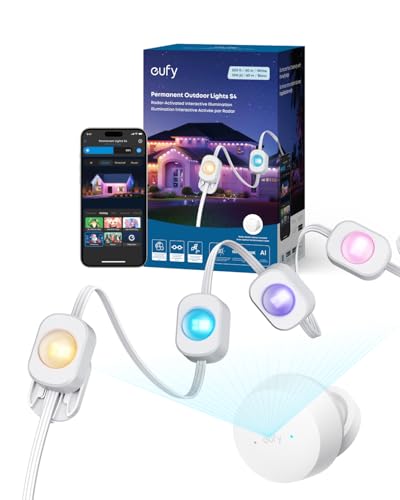
3-in-1 Lighting for Daily, Holiday, and Security: With 120°, 12 m radar coverage, this smart light strip offers precise motion detection for automatic lighting effects that follow your movement. Set customizable security alerts with flashing warnings to deter intruders.
Frequently Asked Questions
How to Fix a Motion Sensor Light That Stays On?
Like resetting a restless clock, they tap the sensor, clean the lens, power cycle the unit, perform sensor sensitivity adjustments to curb motion detection issues, and inspect wiring or call an electrician if problems persist.
Why Is the Sensor Light Not Going Off?
It stays on because excessive sensor sensitivity, incorrect light settings, debris-covered lens, wiring faults, or sensor failure prevent proper dusk/dawn detection; diagnostic cleaning, adjusting sensitivity and settings, or professional repair often quickly resolves persistent issues.
How to Deactivate Motion Sensor Light?
They can silence the beast by flipping the switch off and on within a second to enable override, adjust light activation settings, clean sensor, disable auto‑on, or power‑cycle circuit; consult manual for motion sensor troubleshooting.
How to Reset Outdoor Lighting?
They reset outdoor lighting by switching fixture off for thirty seconds, restoring power, or cutting the breaker for one to two minutes; then adjust sensor sensitivity, clean the lens, and perform lighting troubleshooting reset techniques.


