As an Amazon Associate, we earn from qualifying purchases. Some links on this site are affiliate links at no extra cost to you. Our recommendations are based on thorough research and editorial judgment.


How Long Should Motion Lights Stay On for Security Uses?

1) General: set pedestrian-area motion lights to 20–30 seconds, high-traffic zones to 30–60 seconds, entrances to about 120 seconds, and remote yards to 3–5 minutes for extended observation. 2) Factors: consider sensor sensitivity, lens coverage, mounting height, ambient light and traffic patterns, adjust to minimize false triggers. 3) Implementation: use adjustable-duration fixtures, LED lamps and documented settings for maintenance. Continue for detailed configuration and tests. Consult logs, perform timed trials, and monitor performance over weeks.
Key Takeaways
- Set motion lights 20–30 seconds for general deterrence and short observation of detected movement.
- Extend timers to about 120 seconds at entrances and walkways to allow safe passage and handling of loads.
- Use 30–60 seconds in high-traffic zones to accommodate multiple people and reduce frequent re-triggering.
- Set 3–5 minute durations for remote yards or long approaches to monitor prolonged activity along paths.
- Balance visibility and energy by increasing duration at night, using LEDs, zoning, schedules, or solar-powered fixtures.
Recommended Timer Durations for Different Security Scenarios
1. Section 1: For general security uses, motion sensors should trigger security lights for 20 to 30 seconds, providing sufficient deterrence and observation time. 2. Section 2: In high-traffic areas set timer durations to 30 to 60 seconds, reducing frequent re-triggering while covering multiple movements. 3. Section 3: For entrances and walkways extend on-time to approximately 120 seconds to allow safe passage and load movement. 4. Section 4: In remote yards set timers for three to five minutes to monitor lingering activity along longer paths. 5. Implementation: Install different types of detectors, adjust the sensitivity and pair timers with lamps rated for continuous duty, document settings for operational consistency. This configuration balances surveillance coverage and energy efficiency, ensuring predictable behavior and simplified maintenance protocols. Additionally, ensure your security lights have the necessary IP65 weatherproof rating to withstand harsh outdoor conditions, thus extending their service life and reducing maintenance needs.
Factors That Affect How Long Motion Lights Should Stay On

Because ambient conditions, hardware capabilities, and site-specific security requirements interact to determine ideal on-times, practitioners should evaluate each factor systematically before setting motion-light durations; 1. Assess site characteristics: consider high-traffic zones, concealment points, and typical dwell times, security needs may require duration setting increases to 2–5 minutes for patrols or escorts. 2. Calibrate sensors: adjust sensitivity setting to reduce false triggers from wind-driven vegetation or passing vehicles, detecting movement of humans should remain prioritized over small animals. 3. Configure hardware: select models with adjustable duration setting and verify lens coverage and mounting height to achieve reliable detecting movement across target areas. 4. Maintain systems: inspect for obstructions, stuck relays, and alignment, perform quarterly checks. Document adjustments and review performance metrics after each configuration change. Weatherproof and durable construction is essential for ensuring that motion detection lights remain functional in various outdoor conditions, contributing to optimal security coverage.
Balancing Visibility and Energy Efficiency

When configuring motion-sensor lighting systems, technicians should balance required visibility with energy consumption, adjusting time delays, sensitivity, and scheduling to match operational needs and site traffic patterns. 1. Duration selection: For typical pedestrian areas set motion light duration to 20–30 seconds to permit safe navigation, for enhanced security extend up to 10 minutes where ongoing surveillance is needed, sensors with adjustable time delays permit this flexibility. 2. Traffic and scheduling: Reduce duration during peak foot traffic to conserve energy, increase during late-night low-activity periods to improve monitoring. 3. Energy efficiency measures: Use LED fixtures, guarantee sensors activate only when necessary, implement zoning and timed schedules, these steps lower power draw while maintaining requisite security coverage. Solar-powered efficiency eliminates electricity costs and provides an eco-friendly lighting solution for security purposes. Technicians should document settings and review performance regularly annually.
How to Adjust Motion Light Timers and Sensitivity
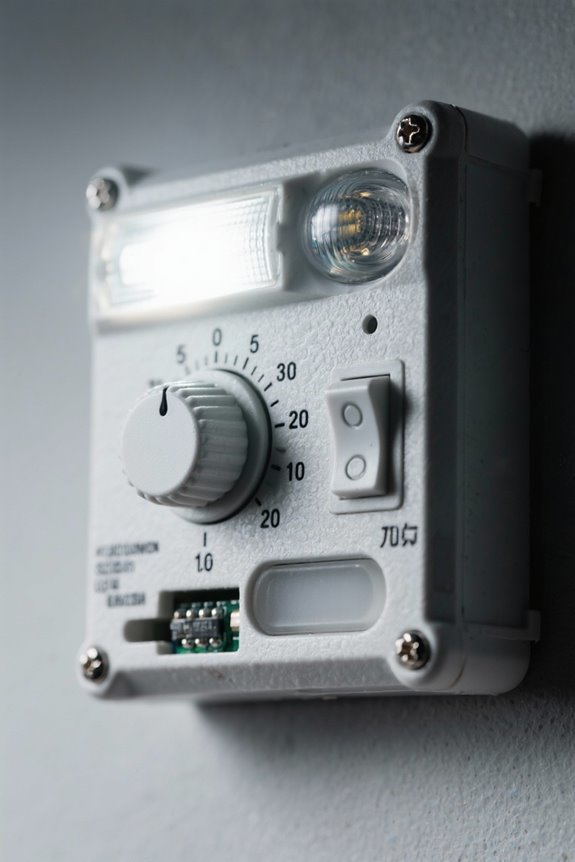
How should a technician methodically set motion light timers and sensitivity to achieve reliable detection without excessive activations, given typical site variations in traffic, ambient light, and mounting height? 1. Assessment: survey traffic patterns, note mounting height in feet, record typical ambient lux levels, then choose baseline motion light timers of 20–30 seconds for initial trials. 2. Configuration: locate sensor dials or switches, reduce sensitivity settings to avoid false activations from small animals, adjust the timer incrementally to minutes if sustained illumination is required. 3. Testing: trigger sensor from multiple distances, document response zones in feet, refine settings for detection consistency and energy efficiency. 4. Maintenance: schedule regular maintenance and calibration, ensuring reliable operation for security purposes. Technicians should record adjustments and review logs. Consider selecting motion lights with IP65 weatherproofing to ensure durability and effective functionality in varying outdoor conditions.
Recommended Products

MULTI-ZONE SYSTEM: Includes multiple indoor air handlers for individual rooms connected to a single outdoor condenser. Each indoor unit features independent temperature control settings.

Nikon designed back side illuminated (BSI) full frame image sensor with no optical low pass filter

Advanced 24.2MP BSI full frame Image Sensor w/ 1.8X readout speed.Aspect Ratio - 3:2, Headphone Terminal : Yes (3.5 mm Stereo minijack), Mic Terminal : Yes (3.5 mm Stereo minijack). Brightness Control (Viewfinder) : Auto/Manual (5 steps between -2 and +2).
Troubleshooting Lights That Stay On Continuously

- Troubleshooting continuous activation: Begin by confirming the timer setting, many motion detector units default to 20–30 seconds but can be adjusted longer, verify it is not set to maximum.
- Sensitivity calibration: If lights stay on, reduce sensitivity settings incrementally, test with objects at 1, 3, and 6 meters to identify ideal detection range that minimizes false alarms.
- Hardware reset and maintenance: Unplug or cut power for at least 10 seconds to reset the unit, clean the sensor surface and remove obstructions to prevent continuous activation from thermal or motion noise.
- Verification procedure: After adjustments, monitor for 24–48 hours and document occurrences for further troubleshooting or professional service. Consider professional diagnostic testing if persistent continuous activation exceeds acceptable incident thresholds levels.
- Ensure that the sensor is angled correctly to minimize false triggers and to maintain optimal functionality, especially in varying weather conditions.
Placement and Sensor Types That Influence Run Time
Because proper placement and sensor selection directly determine detection geometry, run time, and false-trigger rates, installers should follow these guidelines:
- Placement: Mount motion sensor lights at 6 to 10 feet for ideal field of view, aim sensors downward at 15–30 degrees, avoid foliage and pet paths, maintain clear sightlines to reduce false triggers and stabilize run time.
- Sensor types and detection technology: Choose PIR for 10–70 ft coverage where heat-based detection reduces reflections, select microwave sensors when >100 ft range or through non-metallic obstructions is required, consider dual-technology units to lower false alarms.
- Settings and environment: Set time delay to 20–30 seconds as baseline, adjust sensitivity to balance prompt activation with minimal nuisance triggers. Weatherproof-rated fixtures with an IP65 or higher rating are recommended to ensure durability and consistent performance in outdoor conditions.
Test placement and settings periodically for performance.
Recommended Products

OPENLUX Only Make High-Quality: Our LED post top light is ETL listed made of SMD3030 LED chips; High-end driver; heavy-duty aluminum Anti-shock, anti-moisture, no glare, no strobe light, protecting your eyes

【Energy Saving& Large Area Illuminating 】400W LED street light used highest brightens SMD3030 LED chip, with output 100000lm in 5000K daylight, Ideal subsitution for 1600 HPS/MH tranditional lights, reduce your electronic bill by up to 85%.T3 lens technology boosts light efficiency, illuminating 11300ft²large area at 30FT-55FT height.

POWERFUL OUTPUT: Bring ultra bright performance to indoor commercial areas with a 150W UFO LED high bay light that produces 21,000 lumens at high efficiency (140 lm/W). These UFO high bay lights are built for LED high bay lights upgrades in a warehouse, workshop, or garage, delivering clear visibility for work areas, storage aisles, and equipment zones.
Frequently Asked Questions
How Long Should a Security Light Stay On?
About 20–60 seconds typical; a security light should remain long enough to deter trespassers, balancing energy. Experts recommend motion light duration tailored by ideal light timing, programmable settings, security lighting effectiveness, and energy efficiency concerns.
How Long Can a Motion Sensor Light Stay On?
Like a cautious lighthouse, a motion sensor light can stay on from seconds to several minutes; motion sensor duration depends on light sensitivity settings, programmable features, energy efficiency concerns, and installation tips guiding ideal timing.
What Is the Disadvantage of Outdoor Motion Sensor Lights?
They suffer from misplaced sensitivity, installation challenges, limited battery life, and ongoing maintenance requirements; additionally, false activations, coverage gaps, and light pollution can reduce effectiveness, cause annoyance, and complicate reliable outdoor security lighting system performance.
Should Home Security Lights Be on or Off?
Like a lighthouse, they should be on at night when occupied and off or timed when away; light activation and sensor sensitivity should balance outdoor safety with reduced power consumption, following installation tips for placement.


