As an Amazon Associate, we earn from qualifying purchases. Some links on this site are affiliate links at no extra cost to you. Our recommendations are based on thorough research and editorial judgment.

How to Aim Motion Sensors to Ignore Street Traffic

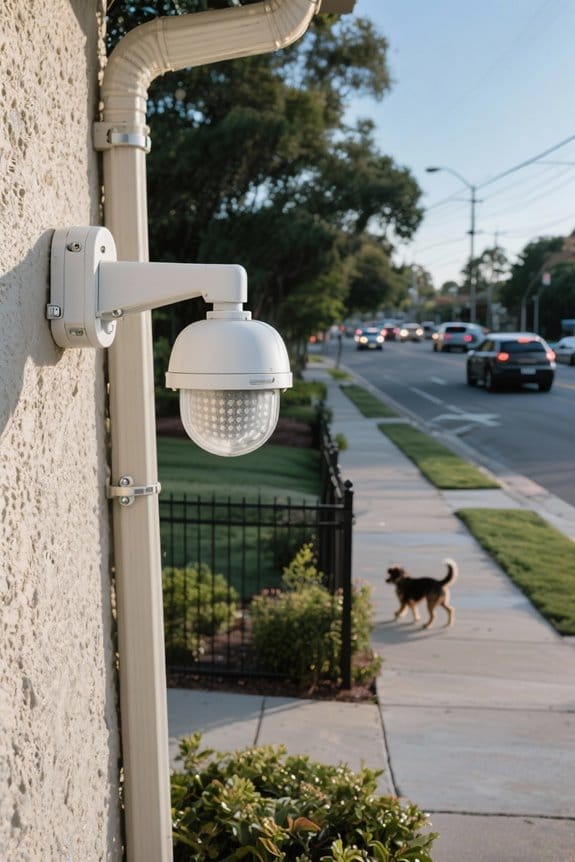
1) Mount: place sensor 6–8 ft high, tilt 15–25° downward, and aim across pathways, not toward roadways, to reduce vehicle PIR activation; narrow horizontal coverage to about 60%. 2) Shield: use masks or louvers to block road-facing lobes, install hedges or fences as physical barriers, and mount under eaves for occlusion. 3) Settings: lower sensitivity by 30–50% and test zones repeatedly. Subsequent sections provide calibration examples and troubleshooting.
Key Takeaways
- Mount sensors 6–8 feet high and aim downward 10–30° to reduce direct sightlines to the road.
- Narrow detection coverage to 60° or use physical masks to block lobes facing traffic.
- Lower PIR sensitivity (30–50% reduction) and test incrementally to avoid losing pedestrian detection.
- Install hedges, fences, or under-eave placement to physically shield sensors from vehicle heat and headlights.
- Use dual-technology sensors or configure exclusion/activity zones and log events to refine false-alarm settings.
Why Street Traffic Triggers Motion Sensors
1. Street traffic triggers sensors when larger, warmer objects cross a Passive Infrared (PIR) sensor’s field, creating infrared change; detection ranges of 8–12 meters and 90° coverage make vehicles within 5–10 meters likely to register. 2. Motion detection responds to mass, speed, and thermal contrast, so cars produce strong signatures compared with pedestrians, particularly at night when contrast increases, causing false activations. 3. Environmental inputs such as direct sunlight, reflections, and wind-driven vegetation create fluctuating infrared baselines, which amplify false positives unless sensitivity is reduced to thresholds. 4. Practical adjustments include angling the unit downward 10–30 degrees, narrowing coverage to 60°, or reducing sensitivity by one to two notches, preserving pedestrian detection. Install at 2.1 meters for zoning, and regularly test over 72 hours. 5. High waterproof ratings such as IP65 or IP68 are essential for motion sensors to ensure they maintain functionality in outdoor environments, where weather can impact sensor performance.
Choosing the Right Sensor Type

How should one select a motion sensor type to balance accurate human detection and minimal false alarms from street traffic? 1. Consider sensor type by evaluating detection principle, range, and adjustability; Passive Infrared (PIR) excels at sensing human heat signatures, is less responsive to vehicle radiative profiles, and typically covers 5 to 12 m effective range. 2. Use dual technology when high reliability is required, combining PIR and microwave elements so both must trigger before alarm, reducing vehicle induced false positives on nearby roads. 3. Evaluate ultrasonic options for pet differentiation within 3 to 6 m, and prefer models with sensitivity control in five to ten steps, adjustable beamwidth, and documented mounting height guidance. Test settings empirically, adjust gradually to minimize street traffic triggers. It is essential to prioritize lumen output and reliable power sources when selecting outdoor motion sensors, ensuring they meet the specific brightness and placement needs.
Recommended Products

The RAVEN is a vehicle motion sensor that uses microwave technology to activate automatic doors and industrial gates. The sensor distinguishes between vehicles and pedestrians through dual relay outputs.

Advanced DualCore Signal Processing DualCore signal processing analyzes PIR and microwave signals through the 5898 microcontroller.

Microcontroller-Based Dual Technology
Optimal Placement and Mounting Angles

While precise placement depends on site geometry and sensor characteristics, adherence to mounting height and aiming principles substantially reduces street-triggered false alarms. 1. Height and lateral placement: Position sensors 6 to 8 feet above ground to reduce response to low-level disturbances, mount so the detection zone covers the intended walkway, and avoid direct sightlines to adjacent roads, this maximizes targeted coverage while limiting exposure. 2. Aiming and angles: Aim downward and laterally, set beam orientation to track movement across the path rather than toward streets, use tilt and pan adjustments to control detection zones and create dead zones toward traffic. 3. Sensitivity settings and verification: Lower sensitivity settings where available, test with real traffic and adjust incrementally to balance detection and nuisance reduction effectively. Additionally, consider utilizing LED-compatible bulbs to enhance overall energy efficiency and improve the fixture’s longevity.
Recommended Products

Sony USA Authorized. Bundle Includes: Sony FX30 Digital Cinema Camera, 64GB Memory Card, Soft Bag, 12 inch Flexible Tripod, Hand Strap, Memory Card Wallet, Cleaning Kit, Lens Cap Keeper

What’s Included - 16 Channel 4K IP NVR with built-in 16 RJ45 PoE Ports, 4MP I/O IP Bullet (6 Pcs.) and 4MP I/O IP Turret Cameras (2 Pcs.), Pre-installed 3TB Video Surveillance Grade HDD, 100’ Cat 5e Cable (8 Pcs.)

What’s Included - 16 Channel 4K IP NVR with built-in 16 RJ45 PoE Ports, 4MP Indoor/Outdoor IP Bullet Cameras (8 Pcs.) Pre-installed 4TB Video Surveillance Grade HDD, 100’ Cat 5e Cable (8 Pcs.)
Using Physical Barriers and Shields

- Physical shielding: Install physical barriers such as hedges or fences four to six feet high, positioned three to five feet from the sensor, to block direct line of sight to the street and reduce false triggers.
- Limited aperture methods: Apply gaffer’s tape or frosted panels to cover peripheral sensor zones, narrowing the effective detection range to approximately two to eight meters, which filters vehicle motion while permitting pedestrian detection.
- Mounting and overhangs: Mount sensors under structural overhangs or eaves, angled downward by 10–20 degrees, to create a shielded field focused on near-property movement.
- Materials and placement: Use opaque or semi-reflective materials strategically, verify coverage, and adjust height for predictable, reliable results. Document settings and measure changes after each modification systematically.
- Consider using weatherproof outdoor lights which are designed to withstand extreme conditions, ensuring reliable performance and reducing maintenance needs.
Recommended Products

PRECISION RED DOT SIGHT WITH 40MM LENS - The SIG SAUER ROMEO8T-AMR 1x40mm Red Dot Sight (SOR8T101) delivers fast target acquisition with a massive 40mm lens and 1x magnification; Ideal for tactical shooters, hunters, and 3-gun competitors needing rapid, parallax-free engagement
DURABLE CONSTRUCTION - The ROMEO-X Enclosed COMPACT, inspired by the MIL-SPEC ROMEO-M17, is constructed with a robust 7075 aluminum housing, meeting military standards for reliability and performance, ensuring robustness to withstand challenging conditions; It is designed with the RX Footprint COMPACT (Shield RMS-c) to fit compact pistols perfectly for reliable performance in concealed carry and compact pistol applications
Single-Sided Power (MX-1): Delivers highly accurate wattage and cadence data from the left pedal, then doubles it for total power. Ideal budget choice for training consistency.
Configuring Sensor Settings and Activity Zones

Precision in configuration is essential, guiding sensitivity selection, activity-zone mapping, and mounting geometry to reduce vehicular false triggers while preserving pedestrian detection. 1. Sensitivity selection: Set sensor settings to low or medium, for example reduce PIR gain by 30–50%, this lowers detection range to approximately 5–8 meters and cuts false alarms from passing cars while maintaining close pedestrian sensing. 2. Activity zones: Define activity zones that exclude the road and sidewalk, draw exclusion polygons covering 2–4 meter strips adjacent to the curb, test visually and adjust until spurious triggers cease. 3. Mounting and masks: Angle sensors downward 15–25 degrees, mount 2–3 meters high, use tape or shields to physically block unused lobes. 4. Maintenance: Log events weekly and refine settings based on performance data. Consider utilizing IP65-rated lights for enhanced durability and weather resistance, ensuring that your outdoor lighting solutions withstand various weather conditions while effectively securing your home.
Recommended Products

✅ 9-in-1 Versatility: ORRGENA UFO LED High Bay Light offers 3 adjustable wattages (300W/45000LM, 240W/36000LM, 180W/27000LM) along with 3 selectable CCT options (4500K Warm White, 5000K Neutral White, 5700K Daylight). Easily customize the brightness and color to create tailored lighting for diverse industrial and commercial environments.

EASY & QUICK INSTALLATION - Most RVs are already prepped for the Vision S sharkfin camera system, eliminating extensive drilling requirements. Not compatible with Vision S+ systems.

POWERFUL OUTPUT: Bring ultra bright performance to indoor commercial areas with a 150W UFO LED high bay light that produces 21,000 lumens at high efficiency (140 lm/W). These UFO high bay lights are built for LED high bay lights upgrades in a warehouse, workshop, or garage, delivering clear visibility for work areas, storage aisles, and equipment zones.
Advanced Alternatives: Cameras and Machine Vision
Section 1 — Overview: Advanced camera systems employ machine vision and deep learning models to classify objects, reduce vehicular false positives, and enable programmable responses. 1. Capabilities: advanced cameras use convolutional networks to distinguish pedestrians from vehicles in real time, analyzing 15–30 frames per second with latency under 200 ms. 2. Configuration: configure activity zones to exclude street areas, set object size thresholds at 0.5–2.0 meters and sensitivity to medium. 3. Thermal options: thermal imaging detects heat signatures, useful at night, with detector resolutions of 160×120 to 640×480 pixels. 4. Integration: connect analytics to smart home hubs using RTSP or ONVIF, trigger automated lighting or motion detection alerts. 5. Maintenance: update models quarterly, verify calibration and field of view, and confirm reduced false alerts. A high-efficiency solar panel design enhances energy conversion, contributing to a sustainable and cost-effective lighting solution.
Recommended Products

ENTERPRISE-GRADE PRODUCTIVITY - Lenovo ThinkPad T16 Gen 4 features a 50 TOPS NPU that powers advanced AI performance. The dedicated neural processing unit offloads demanding tasks to boost effectiveness—delivering enhanced productivity for modern business. MIL-STD-810H military-grade standards for rugged durability, and its massive 86Wh battery ensures long-lasting battery life for all-day uninterrupted work, adapting perfectly to any creative scenario on the go.

ALL-WHEEL DRIVE (CONQUER 70% SLOPES): Built for the most extreme terrains. The X7 features a rugged AWD chassis and deep-tread off-road tires, delivering immense traction to effortlessly climb steep hills up to 35° (70% slope) and navigate muddy, uneven ground without slipping.

POWER FOR YOUR MOST PRODUCTIVE DAYS: Galaxy Book5 Pro 360 models come with a new Intel Core Ultra 7 processor 256V with a higher-performance Intel ARC graphics & newly added AI neural processing unit (NPU) that reaches as high as 47 TOPS to achieve Copilot+ AI.
Frequently Asked Questions
How to Trick a Movement Sensor?
60%: they can trick a movement sensor by masking about 60% of its lens with tape, using sensor placement techniques, adjusting sensor sensitivity settings, and employing fatigue detection methods to reduce false alarms outdoors overall
What Are Two Drawbacks of Using Motion Sensors?
They produce false alarms and have limited range, compromising reliability and coverage; weather interference can trigger or mask detections, causing inconsistent performance, increased maintenance, user frustration, and reduced overall security confidence and diminished deterrent effect.
What Happens if You Put Tape Over a Motion Sensor?
Putting tape over a motion sensor reduces sensitivity and can block detections, like a curtain coinciding with passing cars; producing motion sensor effects that limit range; they select tape materials to avoid permanent sensor interference.
How Do I Block My Neighbor’s Motion Sensor?
They should address the issue through conversation, propose adjusted motion sensor placement or sensor zones, explore privacy fences or landscaping; maintaining neighbor relations, documenting privacy concerns, consulting local regulations or mediation preserves safety and legality.


