As an Amazon Associate, we earn from qualifying purchases. Some links on this site are affiliate links at no extra cost to you. Our recommendations are based on thorough research and editorial judgment.


Checking and Updating Settings on Smart Motion Lighting Over Time

1. Monthly: inspect lenses, clean sensors with compressed air, verify 30 cm clearance and mount integrity, log firmware versions. 2. Quarterly: perform 10–20 minute walk tests at 1 m intervals, adjust PIR sensitivity for 3–6 m human detection and set range to 3–5 m for pedestrians. 3. Lux: sample multiple points with a meter, set threshold 10–800 lx. 4. Updates: apply firmware monthly, enable 2FA and backup. Continue for full procedures. See vendor guides next.
Key Takeaways
- Schedule monthly basic and quarterly thorough checks, inspecting sensors, lenses, and documenting findings for trend tracking and future reference.
- Calibrate PIR/microwave sensors with incremental sensitivity changes and 1‑meter interval walk tests to eliminate false triggers and coverage gaps.
- Set and periodically adjust lux thresholds per zone (10–800 lux) using a handheld meter, starting conservatively and refining over time.
- Apply firmware and app updates monthly, enable two‑factor authentication, audit logs, and backup configurations before major changes.
- If faults persist after three resets, inspect wiring, breakers, and surge damage; escalate to a licensed electrician when measurements fall outside tolerance.
Why Regular Checks Matter for Smart Motion Lighting
You may be interested

How often should occupants perform regular checks on smart motion lighting settings to maintain detection accuracy and system reliability? 1. Inspection frequency: conduct basic checks monthly, and perform thorough evaluations quarterly, each lasting 10–20 minutes per fixture, to verify sensors, lenses, and firmware versions. 2. Sensor calibration and adjustments: review sensitivity settings after seasonal environmental factors or landscaping work, reduce sensitivity by 10–30% to limit false alarms from small animals, increase duration incrementally for safety corridors. 3. Maintenance procedures: cleaning the sensor with compressed air or lint-free cloth every three months, remove debris within a 1–2 meter detection zone, log firmware updates and community-recommended configurations. 4. Verification: test activation range and document results. Reassess settings after events, and record all adjustments made promptly. Additionally, verify compatibility with existing smart home platforms to ensure seamless integration and functionality.
Understanding Motion Sensor Settings and Terminology

A homeowner or installer should understand motion sensor parameters before adjusting settings, since PIR and microwave technologies respond differently to range, speed, and thermal contrast. 1. Sensor types and principles: PIR detects infrared from warm bodies, effective at 3–10 m for human-sized targets, microwave emits pulses and detects motion through thin obstacles, useful where thermal contrast is low. 2. Sensitivity settings: sensitivity settings alter trigger threshold, higher settings increase false alarms from small animals or wind-driven foliage, lower settings reduce coverage, calibrate to target size and typical speed. 3. Duration and light modes: duration settings typically range 30 seconds to 30 minutes, 1–2 minutes recommended for daily use, smart lights often include a continuous-on light mode toggle for extended illumination. Look for high brightness (300 to 1000 lumens) to ensure effective illumination of the area, as this will enhance the performance of motion sensor lighting. Follow manufacturer calibration procedures.
Adjusting Lux Thresholds for Daylight and Nighttime

- Section overview: When adjusting lux thresholds for daylight and nighttime, the setting determines activation based on ambient brightness, preventing unnecessary activation during daylight and ensuring nighttime operation.
- Recommended range: Set thresholds below 1000 lux, typically 10–800 lux for outdoor motion sensor lights, which allows sensors to detect movement during bright dawn and dusk.
- Area customization: Technicians should customize lux levels per zone, using a handheld meter to sample natural light at peak and low times, then program values accordingly.
- Update cadence: Regular recalibration reduces false triggers from streetlights or headlights, enhances energy efficiency, and maintains security.
- Implementation tip: Start at conservative values, then adjust based on field observations. Document changes, monitor over several weeks, refine thresholds for long-term reliability.
- New sentence: For optimal performance, solar panels should be oriented south at a 20-35° tilt to maximize sun exposure, which is crucial for charging efficiency and maintaining light functionality.
Recommended Products

ENERGY SAVING: LED units output 72W, 7500 Lumens, 5000K brightness(daylight white), equivalent to 720W incandescent bulb. Also save your electricity bill by up to 88%.

Hardwire connection, NO battery powered, NO solar powered, NO plug in, NO camera

ENERGY SAVING: LED units output 72W, 7500 Lumens, 5000K brightness(daylight white), equivalent to 720W incandescent bulb. Also save your electricity bill by up to 88%.
Setting Motion Sensitivity and Detection Range

When configuring motion sensitivity and detection range, technicians should target human-sized detection at 3–6 meters with a 100° horizontal field, minimizing animal and traffic triggers. 1. Purpose and targets: Set motion sensitivity to reliably detect adult human movement at 3–6 meters, adjust detection range to cover entry points, avoid activation from adjacent road traffic or vegetation. 2. Calibration procedure: Use adjustable sensitivity increments, perform walk tests at 1 m intervals, record responses, and reduce sensitivity when false triggers occur from pets or wind-blown objects. 3. Verification and documentation: Consult the user manual for model-specific steps, test overlapping sensors to prevent gaps, log settings and times for future audits, and provide clear recommendations for re-calibration. Re-test seasonally, and after landscaping or structural changes as needed. Beams MB572 provides 35 lumens for safer pathways and detects movement up to 12-15 ft, making it a suitable choice for those requiring moderate illumination and a reliable detection range.
Recommended Products
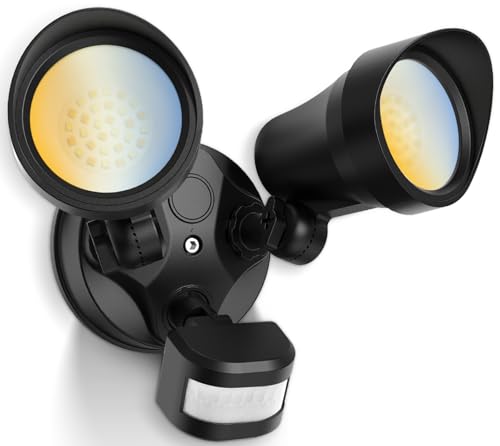
【Hardwire Connection】Motion sensor outdoor lights AC 120V (108V-132V). No Solar Powered/No Battery/No Plug/No Camera. 5 Years Coverage.
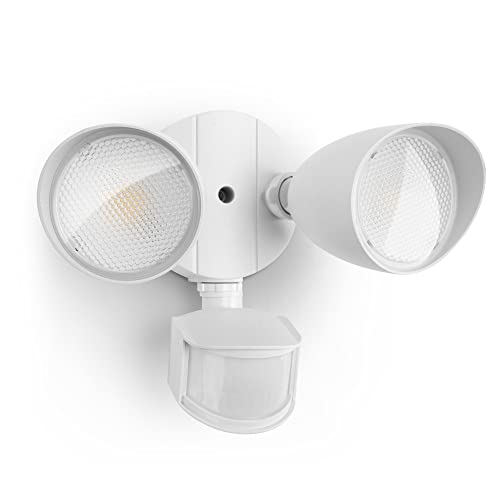
ENERGY SAVING: LED units output 32W, 3500 Lumens, 5000K brightness(day light white), equivalent to 150W halogen light. Also save your electricity bill by up to 88%

7000 LM Super Bright and Energy Saving: The 75 W outdoor flood light is illuminated by 112 high quality and efficient LED beads, producing up to 7000 LM high brightness output, equivalent to 450 W traditional normal bulbs, saving 85% of your electricity bill
Configuring Light Duration and Manual Override Modes

How should motion-activated luminaires be set for duration and manual override, balancing the 30-second to 30-minute adjustable range with a practical 1–2 minute default for everyday use? 1. Duration selection: recommend the 1-2 minute recommended setting for corridors and motion-activated lights, while programming 30 seconds to 30 minutes when required, set time precisely using device timers, and document chosen seconds for consistency. 2. Manual override modes: explain that quick switch toggles enable continuous on, useful for maintenance or gatherings, and guarantee override interacts predictably with automatic schedules. 3. Sensitivity coordination: combining configuring sensitivity settings with duration prevents false triggers, adjust PIR detector thresholds and retrigger timers. 4. Review cadence: periodically verify settings, log changes, and optimize for occupancy patterns. Follow manufacturer guidance for safety. Ensuring compliance with standards such as local regulations and HOA guidelines can help maintain neighborhood harmony and avoid penalties.
Recommended Products

AUTOMATIC SWITCH: Motion sensor light switch automatically turns the lights on when you enter the room and off when you leave, great for bathrooms, garages, laundry rooms, or closet light switches

AUTOMATIC SWITCH: Motion sensor light switch automatically turns the lights on when you enter the room and off when you leave, great for bathrooms, garages, laundry rooms, or closet light switches

Motion sensor switch detects motion to automatically turn ON/OFF lights, fans and motors based on the occupancy or vacancy in a room. Wall Plate Included
Firmware, App Updates, and Smart Home Integrations
Firmware updates and mobile application maintenance constitute the foundational tasks that preserve performance, close vulnerabilities, and enable new automation features for motion-activated luminaires, ensuring reliable detection, correct timing behavior, and secure communications with smart home platforms.
- Update cadence: Schedule firmware updates, app updates at least monthly, or immediately after vendor advisories, to receive performance patches, latency reductions, and timing corrections, typically distributed as 5–50 MB delta packages over secure TLS channels.
- Integration: Configure smart home platforms such as Amazon Alexa or Google Assistant using OAuth or local API keys, test voice routines, and map motion lighting settings to specific scenes or schedules. Make sure that your smart home system is compatible with dusk to dawn sensors to enable seamless automation of lighting based on natural light conditions.
- Security: Audit logs, enable two-factor authentication, and apply patches promptly to reduce security risks. Maintain backups before each major update.
Recommended Products

【Advanced Motion Detection】Completely hands-free and smart operation of your connected lights. The switch automatically turns lights on when motion is detected and turns off after a preset time. Ideal for areas such as bedrooms, hallways and restrooms where hands-free operation is ideal.

【RGB/ Cool/ Warm White and Lighting Modes】Enjoy full control over color with 16 million options and tunable white light (Cool/ Warm White), allowing you to personalize your outdoor environment to match any mood or setting. Choose from three lighting modes: Motion for safety and efficiency, Luminance for automatic dusk-to-dawn lighting, and Continuous for constant illumination.

【Advanced Motion Detection】Completely hands-free and smart operation of your connected lights. The switch automatically turns lights on when motion is detected and turns off after a preset time. Ideal for areas such as bedrooms, hallways and restrooms where hands-free operation is ideal.
Troubleshooting Common Motion Sensor Problems
- Diagnostic overview: Technicians should first verify power and bulbs, measuring voltage at 110–120 V AC for typical circuits, then observe behavior when detecting motion to determine if the issue is activation failure or continuous operation.
- Sensor cleaning and alignment: Clean the Sensor lens with a lint-free cloth and isopropyl alcohol, inspect for obstructions within 1–2 meters, and confirm field-of-view alignment to avoid false positives.
- Sensitivity and reset procedures: Adjust sensitivity settings incrementally, reducing range to 3–5 meters for pedestrian detection, and perform a Reset Motion Sensor cycle after power events.
- Escalation criteria: If faults persist after three resets and adjustments, recommend electrical inspection for tripped breakers or surge damage in residential and commercial installations.
- It is crucial to consider the IP65 weatherproofing rating of motion sensors to ensure they function reliably in outdoor environments.
Document all steps and timestamp results.
Recommended Products

【Remote Control & 3 Lighting Modes】:Each solar motion sensor light is equipped with wireless remote control.You can choose the most suitable mode faster and more portable: ①Strong light sensor mode ② Dim light sensor mode ③Strong long light mode. Different lighting way for your daily requirement.

【9000LM SUPER BRIGHT 4 HEAD FlOOD LIGHT】With an output of 80W, this floodlight emits a powerful 9000 lumens of 5000K light. The four adjustable heads and unique four beam design provide uniform and extensive illumination, ensuring coverage of up to 2,370 sq. ft. Additionally, it offers over 88% energy savings compared to traditional halogen bulbs.

Solar Powered & Energy Saving: Solar spot lights use solar energy to charge, which can automatically sense light, automatically turn on at night, and automatically charge during the day, saving electricity and reducing energy consumption. No wires are required, which not only saves energy, but also saves you a lot of money on your electricity bill
Maintenance, Safety Checks, and When to Call a Pro
Technicians and homeowners should conduct scheduled maintenance on smart motion lighting systems, inspecting lenses, verifying electrical connections, and auditing settings at defined intervals. 1. Inspection and cleaning: Regularly remove dust from lenses with a soft cloth, maintain 30 cm clearance from obstructions, and verify sensitivity and duration settings to guarantee sensors are functioning correctly. 2. Electrical safety checks: Inspect wiring, connectors, and fixtures for signs of wear, loose terminals, or overheating, measure voltage within manufacturer tolerance, call a licensed electrician if anomalies persist. 3. Software and features: Schedule firmware updates, confirm additional features operate as intended, adapt settings to improved technology and changing security needs. 4. When to call a pro: After multiple resets or persistent faults, seek professional diagnostics. Products with IP65 ratings are especially durable and resistant to harsh weather conditions, making them ideal for outdoor use. Prompt action reduces risk.
Frequently Asked Questions
How Do I Change the Settings on My Motion Sensor Light?
Adjust, modify, change, enable/disable, schedule. The owner uses fixture knobs or the mobile app to adjust sensitivity settings, modify detection angle, change activation duration, enable/disable ambient light and schedule lighting times, then tests each adjustment.
How to Reprogram Motion Sensor Light?
They reset the unit at the breaker, enter programming mode, then adjust sensor sensitivity and light duration, consider environmental factors, and follow troubleshooting tips in the manual for model-specific reprogramming techniques as needed for reliability.
How to Reset Motion Sensor Lights?
Victorian pocket watch: They power off at the breaker 1–2 minutes or flip the wall switch 30 seconds, restore power; consider motion sensor types, troubleshooting common issues, optimizing sensitivity settings, power source options, installation practices.
How to Check if a Motion Sensor Is Working?
They verify a motion sensor by performing testing techniques: walk through detection zones, inspect sensor placement and clean lens, apply troubleshooting tips after power loss, consider environmental factors like temperature, and perform routine battery maintenance.


