As an Amazon Associate, we earn from qualifying purchases. Some links on this site are affiliate links at no extra cost to you. Our recommendations are based on thorough research and editorial judgment.


How Often to Clean Motion Sensors and Lenses Outdoors

1. Importance: Clean optics when dust reaches ~0.1 mm, or monthly in urban areas, quarterly in rural sites, bi-weekly during pollen or after storms to preserve sensitivity and signal-to-noise ratios. 2. Procedure: Power down, use compressed air, wipe with microfiber and lens solution, inspect seals and IP65/66 housings, test with targets at 1–10 m and log results. 3. Escalation: Recalibrate or call pro if performance drops >20% or false triggers exceed 10/hour. More guidance follows.
Key Takeaways
- Clean outdoor motion sensors and lenses monthly in urban or coastal areas, and every three to four months in rural settings.
- Increase cleaning to bi-weekly during high pollen, leaf fall, or heavy dust seasons.
- Inspect and clean immediately after storms, heavy rain, snow, or visible salt and debris buildup.
- Use compressed air, microfiber cloth with lens solution, nitrile gloves, and inspect seals and housings for damage.
- Log each cleaning, retest sensor function, and schedule professional inspection for persistent false triggers or visible corrosion.
Why Regular Cleaning Matters for Motion Sensors and Lenses
1) Importance: Regular cleaning of motion sensors and the camera lens preserves detection accuracy, prevents false activations, and reduces missed events by maintaining unobstructed optical paths and sensor apertures. 2) Technical effects: Dust layers as thin as 0.1 mm scatter infrared and visible light, degrading sensitivity and image contrast, so removal improves signal-to-noise ratios and detection thresholds. 3) Practical steps: Use microfiber cloths, 70% isopropyl wipes, and a soft brush, apply gentle circular motions, avoid solvents on seals, and keep cleaning intervals documented. 4) Maintenance outcomes: Regular maintenance extends device lifespan, improves energy efficiency by preventing continuous triggering, and guarantees reliable security performance with predictable metrics. Inspect mounts and adjust alignment to within 2 degrees after cleaning, record results for warranty and troubleshooting. Adding weather resistance ratings to your outdoor motion sensors and lights can further prolong their lifespan by ensuring they withstand harsh conditions.
How Weather and Environment Affect Cleaning Frequency

Although local climate and site conditions dictate maintenance needs, they can be categorized to produce repeatable cleaning intervals and inspection triggers. 1. Urban and rural: In urban areas clean sensors and camera lenses at least once monthly to remove dust and pollution, in rural settings schedule cleaning every three to four months, verify particulate levels during dry seasons. 2. Seasonal and vegetation: Increase frequency to bi-weekly during high pollen or leaf fall, inspect vegetation within 2 to 3 meters, trim back branches to reduce contamination. 3. Coastal and weather events: In coastal zones clean every few weeks to remove salt residue, perform post-rain or snow inspections and immediate cleaning when debris covers optics, document procedures to optimize performance. Additionally, solar panel efficiency can be improved by regular cleaning and ensuring optimal tilt and orientation towards the sun, as highlighted in the knowledge section for maintaining solar motion security lights. Maintain logs and adjust intervals based on measurements.
Cleaning Schedule Recommendations by Location and Conditions

For practical scheduling, the following location- and condition-specific recommendations establish baseline cleaning intervals, inspection triggers, and implementation steps to maintain sensor sensitivity and optical clarity. 1. Urban: Clean monthly, inspect weekly for grime, use damp microfiber, document cleaning schedule, note particulate buildup to preserve performance over time. 2. Coastal: Clean monthly with fresh water rinse, inspect after storms for salt deposits, log maintenance and corrosion indicators, apply protective coatings per manufacturer guidance. 3. Industrial: Clean biweekly to monthly depending on visible deposits, perform quantitative inspection with 10x loupe, replace seals if compromised. 4. Rural and Seasonal: Clean every three to six months, increase frequency during spring pollen and autumn leaf fall, schedule pre- and post-season checks, record results for trend analysis. Maintain manufacturer recommendations. Low voltage patio lights are suitable for various climates, maintaining functionality, making them a reliable option for outdoor settings.
Essential Tools and Supplies for Safe Outdoor Cleaning

A concise toolkit enables safe, effective outdoor cleaning of motion sensors and lenses, minimizing risk to optical coatings and internal electronics while preserving manufacturer warranties and operational sensitivity. 1. Essential components: a soft lint-free microfiber cloth (200–400 GSM), a dedicated lens cleaning solution for optical coatings, and a gentle air blower or canned compressed air for particle removal, each stored in a clean case. 2. Ancillary supplies: nitrile gloves, a water-dampened nonabrasive cloth for housings, precision cotton swabs, and small screwdrivers for access panels, used with power off to avoid electrical damage. 3. Implementation: follow a documented maintenance schedule, inspect monthly in urban settings and quarterly in rural areas, record procedures and replace consumables after visible contamination. Verify tools are clean before each use. Consider using lights with IP65 weatherproofing to ensure longevity and resistance to environmental factors, which helps minimize the need for frequent maintenance.
Step-by-Step Cleaning Process for Sensors and Camera Lenses

- Power down and dust removal: Before any contact, switch off power to the outdoor security cameras and disconnect power, use a gentle air blower or compressed air at 20–30 psi to remove loose dust from sensors and the lens assembly.
- Wet cleaning: Dampen a 10×10 cm microfiber cloth with 2–3 drops of lens cleaning solution or distilled water, never apply liquid directly to openings, and wipe the lens in circular motion from center outward to avoid streaks.
- Drying and inspection: Buff with a dry microfiber cloth, check for lint and obstructions in the field of view, power on and test motion detection and night vision.
- Schedule: Clean monthly in urban areas, quarterly in rural settings to maintain peak performance.
- To ensure weatherproof designs maintain their integrity over time, inspect the housing and seals of the motion sensors during cleaning sessions.
Recommended Products

Patented 4-in-1 cleaning head with attached microfiber mitt

4K Video and Photos for Day and Night Use: GOYOJO night vision goggles capture crisp 4K video with audio and high-resolution 36MP photos, helping you record clear details during nighttime exploring, wildlife observation, camping, farm security, and outdoor patrol use.
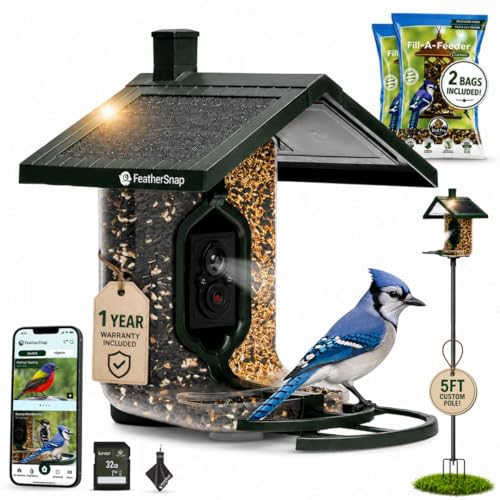
MOST COMPLETE BUNDLE — POLE, SEEDS, SD CARD & CLEANING CLOTH INCLUDED: Everything you need from day one — the FeatherSnap smart bird feeder, mounting pole, 2 Fill-A-Feeder seed bags, a 32GB SD card for extended local video storage, and a cleaning cloth to keep the lens crystal clear. Plant the pole, fill the chambers, and start watching birds immediately. Nothing left to buy.
Cleaning Techniques for Glass vs. Polycarbonate Lenses
Frequently, routine cleaning procedures should be selected based on lens material, environmental exposure, and optical tolerances, with technicians choosing appropriate solvents, cloths, and mechanical actions to prevent abrasion or chemical degradation. 1. Glass lenses: Use distilled water with 0.5% surfactant or manufacturer optical solvent, apply with microfiber cloth concentric motions, maintain 0.5–1 N fingertip force, avoid abrasive pads, inspect at 10x magnification for scratches. 2. Polycarbonate lenses: Employ non-alcohol, pH-neutral solutions, use a microfiber cloth with minimal pressure, limit alcohol-based cleaners to infrequent spot treatments, prevent hazing by rinsing within 30 seconds. 3. Scheduling and verification: Adjust intervals for dust load, document procedures, and perform performance checks after cleaning. Technicians should record ambient particulate counts, note UV exposure, and retain photographic evidence for quality. In outdoor lighting applications, it’s important to ensure that the motion sensors and lenses have at least an IP65 rating to protect against dust and water jets, maintaining their functionality in harsh weather conditions.
Maintaining Motion Sensor Performance and Calibration
Building on lens-specific cleaning methods described above, maintenance should extend into performance verification and calibration to preserve detection range, sensitivity, and false-alarm immunity after any cleaning or environmental event.
- Inspection: Visually check sensors monthly in urban areas, every three months in rural settings, and after pollen storms or salt spray, noting obstructions that affect motion detection. Regular maintenance of outdoor lights, including weatherproof characteristics, ensures they remain reliable under various conditions.
- Functional test: Trigger known targets at standard distances (1–10 m), record response time and angle, compare against manufacturer specifications, and clean lens before retesting if thresholds are missed.
- Calibration: Adjust sensitivity settings in small increments, document changes, repeat tests, and schedule professional recalibration if deviations exceed 20% or anomalies persist. Maintain logs, inspect power and mounting stability, and verify firmware versions regularly at least monthly.
Identifying and Fixing Common Contaminants and Damage
When inspecting outdoor motion sensors for contaminants and damage, technicians should follow a numbered protocol that differentiates identification, remediation, and verification steps. 1. Identification: visually examine sensor housings, cameras lens surfaces, and surrounding mounts for dust, pollen, bird droppings, spider webs, salt spray crystallization and soot; measure obscuration with a 5–10 cm clear aperture template and record percentage loss of field, noting moisture, condensation, or corrosion. 2. Remediation: remove loose debris with a gentle air blower, dissolve residues with specialized lens cleaning solution applied to lint-free wipes, neutralize salt with fresh water rinse, and treat seals with silicone conformal coating where appropriate. 3. Verification: perform a functional motion detection test at 3–5 m, document performance, and schedule follow-up inspections. Maintain records for trend analysis. Additionally, ensure that the IP65 or IP66-rated housings are intact to provide optimal weather resistance and protect against environmental damage.
When to Call a Professional for Inspection or Repair
How should maintenance staff determine when to escalate to professional inspection and repair, particularly where measurable degradation or recurrent faults compromise performance or safety? 1. Thresholds and indicators: if sensors trigger erroneously more than 10 times per hour, or false alarm rate exceeds 5%, schedule professional inspection within 72 hours, as frequent activations indicate internal fault or environmental interference requiring diagnostics and component-level repair. 2. Visible damage: cracks larger than 1 mm, corrosion on terminals, or damaged wiring insulation necessitate immediate professional inspection for safe remediation. 3. Deferred cleaning or maintenance beyond 12 months should prompt professional assessment and preventive maintenance. 4. Complex systems combining multiple sensors require periodic professional inspection for calibration, zoning optimization, and firmware updates. This reduces downtime and liability considerably. Additionally, wireless outdoor lights, especially those with smart home integration, should be regularly assessed for software updates to maintain connectivity and functionality.
Tracking Maintenance: Logs, Reminders, and Best Practices
Multiple maintenance teams should implement structured tracking systems, including logs, reminders, and procedural checklists, to document sensor cleaning and performance metrics. 1. Records: Maintain a maintenance log that records date, time, technician ID, cleaning method, solvent concentration (e.g., 70% isopropyl), contact pressure (light, <0.5 N), and measured visibility improvement in lux. 2. Scheduling: Apply cleaning schedules based on environment, monthly in urban high-debris zones and quarterly in rural sites, with reminders set in CMMS and calendar alerts, and adjust frequency after heavy storms. 3. Procedures: Use checklists to verify dust removal, lens inspection under 10x magnification, gasket integrity, and functional tests at 2 m and 5 m ranges. 4. Feedback: Incorporate user reports to refine best practices and update protocols. Review quarterly for compliance. Additionally, motion detection specifications should be assessed to ensure sensors are operating within optimal ranges and are not prone to frequent false triggers.
Frequently Asked Questions
How to Clean an Outdoor Security Camera Lens?
They power off the camera, blow dust, wipe the lens with a microfiber cloth dampened with distilled water or lens solution; inspect in light, repeat necessary. Outdoor camera care, lens maintenance tips, security camera upkeep.
How Often Do I Need to Clean My Camera Sensor?
Cameras should have sensors cleaned every few months, monthly in dusty or coastal locations. Routine inspections and tools reduce buildup; camera maintenance tips include checking seasonal changes, adjusting sensor cleaning frequency, practising outdoor lens care.
How to Clean a Motion Detector Sensor?
50% of false alarms stem from dirty sensors. Technicians recommend gentle cleaning techniques: inspect for webs, use compressed air, wipe with a damp microfiber cloth, avoid harsh chemicals—sensor maintenance tailored for outdoor challenges and longevity.
How Often Should I Clean My Contact Lens Case?
They should clean the contact lens case daily, rinse with fresh solution, air dry, and replace every three months; soak in 3% hydrogen peroxide weekly. Contact lens maintenance, lens case hygiene, and eye care tips.


